AI collaboration
AI support inside the risk assessment itself
Probavis does not integrate artificial intelligence merely as a separate information or text tool. A connected AI agent can capture the content of the open project and support you directly in working on the risk assessment.
For example, it can prepare suggestions for functions, hazards and protective measures, supplement existing entries, or assign standards and requirements. The results become visible directly in the project structure, where you can review them professionally and continue working on them.
The AI does not take over your responsibility. It supports individual work steps – you decide which content is technically correct and remains in the project.
Work directly in the open project
The AI gains access to the content of the currently open project that you have released. This allows it to take the existing relationship between machine, functions, hazards, evaluations and protective measures into account.
Instead of manually transferring suggestions from a chat window into the risk assessment, structured entries can be created or supplemented directly in the project. This reduces transfer effort and facilitates further professional review.
Use the AI system of your choice
Probavis is not permanently tied to a single AI provider. Through the open and documented interface, you can use a compatible AI system that matches your technical, organizational and data protection requirements.
For example, you can connect a system already in use in your company. Probavis does not require a specific AI model or an additionally mandated AI subscription for this.
Whether and which costs arise with the chosen AI provider depends on its respective terms of use.
Every change remains reviewable
Content created or modified by the AI appears immediately in the user interface. You can review, supplement, correct or discard the results.
Unwanted changes can be reversed via the undo function. Professional control thus remains with the person who works on and is responsible for the risk assessment.
AI at work
How an AI agent works together with Probavis
The following example shows how Probavis works together with a connected AI system.
The starting point is a hazard already recorded on a table saw: contact with the rotating saw blade. The protective measures already in place are documented in the project. In addition, it is to be examined whether technical skin-contact detection can reduce the remaining risk further.
Four steps make visible what the AI prepares, how Probavis structures the information, and where your own technical review begins.
- 01
Describe the task – without dictating input masks
You state in a few sentences what needs to be done:
- add a further protective measure;
- research the underlying technical principle;
- review the affected life phases and safety requirements;
- prepare a provisional residual risk evaluation.
You do not have to name any fields or point to a position in the project tree. The connected AI agent draws on the released context of the open project and assigns the task to the existing hazard.
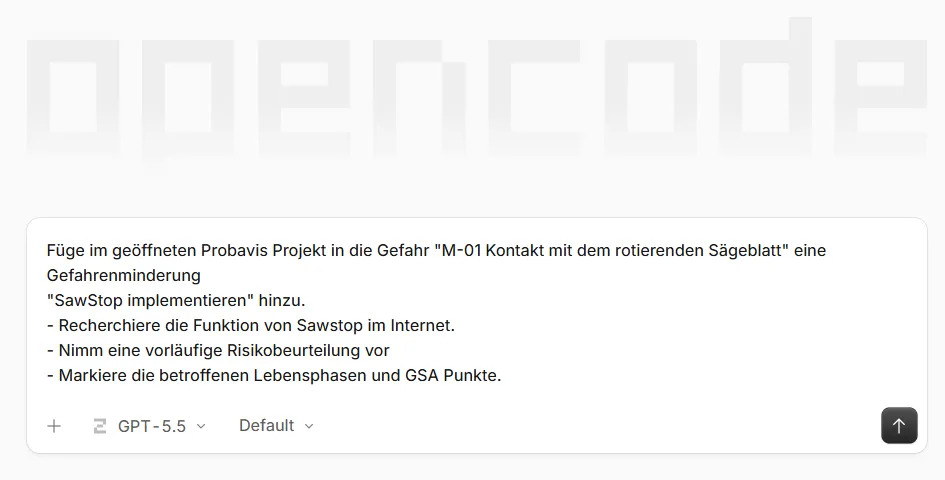
The task as given to the connected AI system. SawStop is a registered trademark of SawStop, LLC.
- 02
The agent documents its proposals and assumptions
The AI agent does not merely draft a piece of text. It first describes the technical principle behind the intended protective measure and takes account of recognisable limitations, necessary checks and possible follow-up measures.
It then sets out openly:
- which entry it created in the project;
- which life phases it assigned;
- which essential health and safety requirements may be affected;
- which parameters it used for the provisional evaluation;
- which details still require technical review or validation.
This keeps it traceable which information was adopted and on which assumptions the proposal rests.
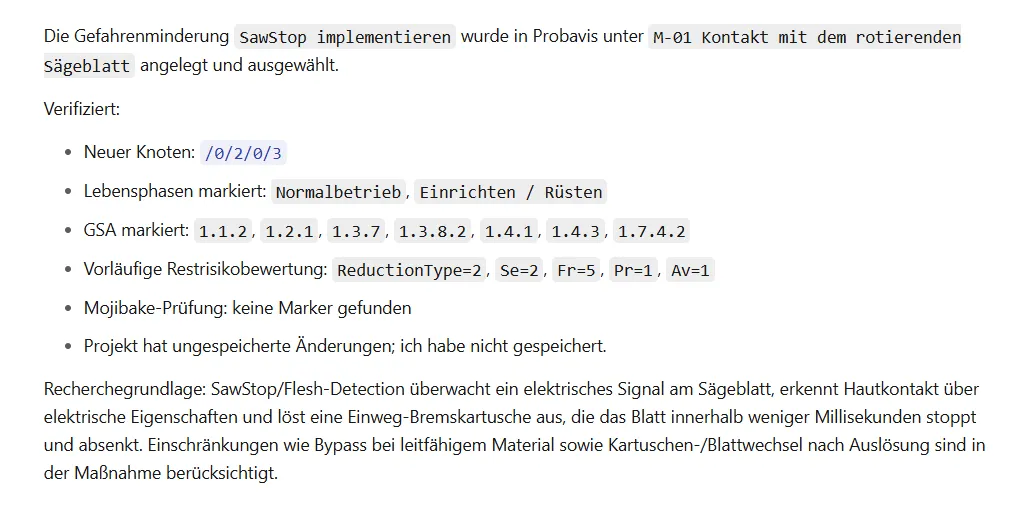
The reply from the AI agent, with the prepared changes and the open points for review. - 03
The protective measure sits structured in the project
The new entry does not just appear in the chat log. Probavis files it as a risk reduction directly beneath the hazard it belongs to in the project tree.
Title, description, notes to be placed on the machine, affected life phases and the parameters of the residual risk evaluation are available in the very same input fields used when working manually. Probavis derives score and risk level from the entered parameters Se, Fr, Pr and Av.
You can now take the prepared entry and:
- review it technically;
- supplement or rewrite it;
- correct the evaluation;
- change the assignments;
- or discard the change entirely.
The AI prepares the work. What stays in the project is your decision.
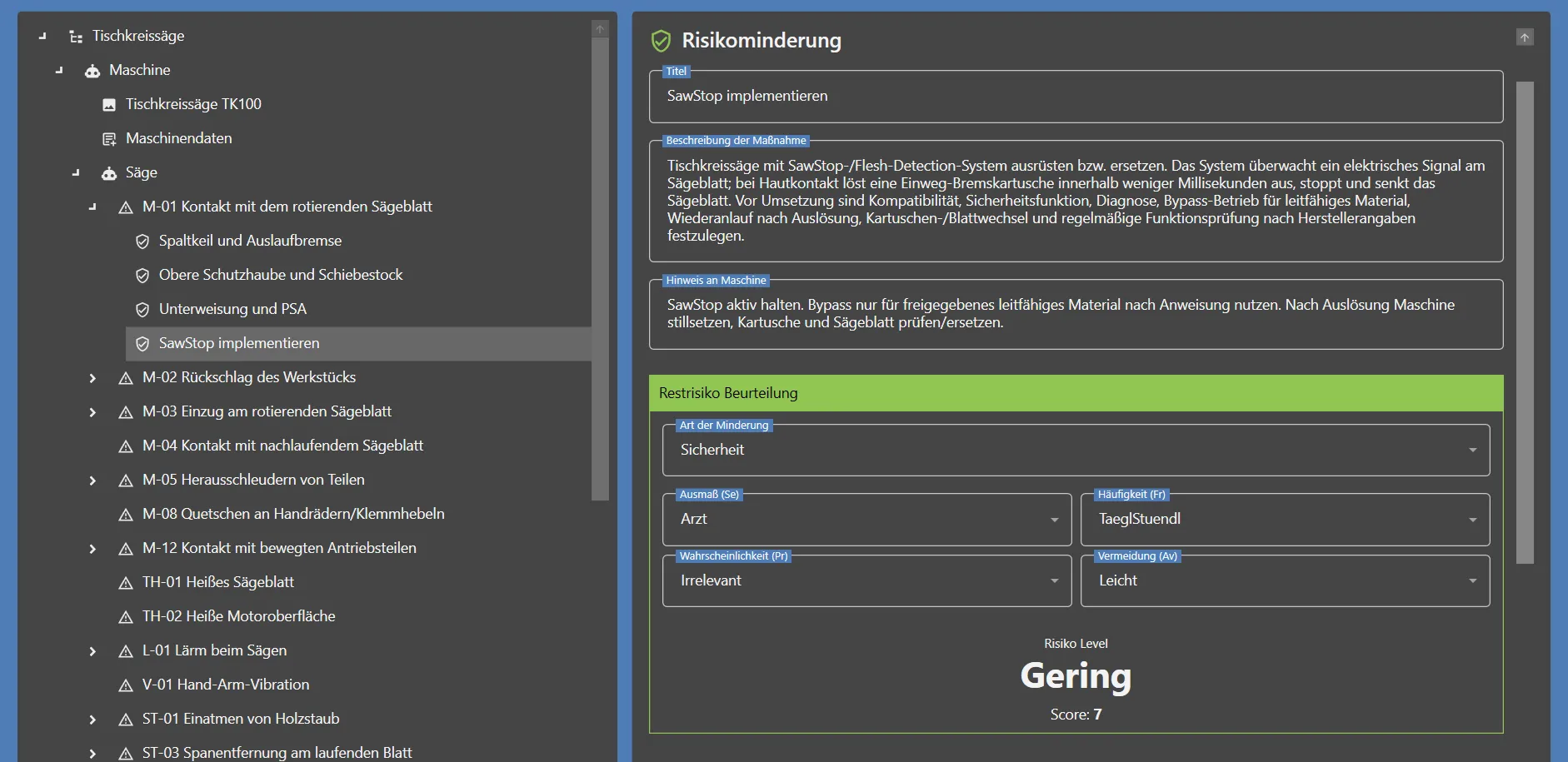
The prepared protective measure in the project tree and in its input mask. - 04
Confirmed content flows straight into the report
Once you have reviewed it, the protective measure is carried into the structured PDF report together with the information belonging to it.
This can include:
- description and type of the measure;
- notes to be placed on the machine;
- assigned life phases;
- parameters and result of the residual risk evaluation;
- reasoning and validation points still open.
No additional transfer into a spreadsheet or a separate text document is required. The confirmed content comes straight from the Probavis project and continues to be edited and managed there.
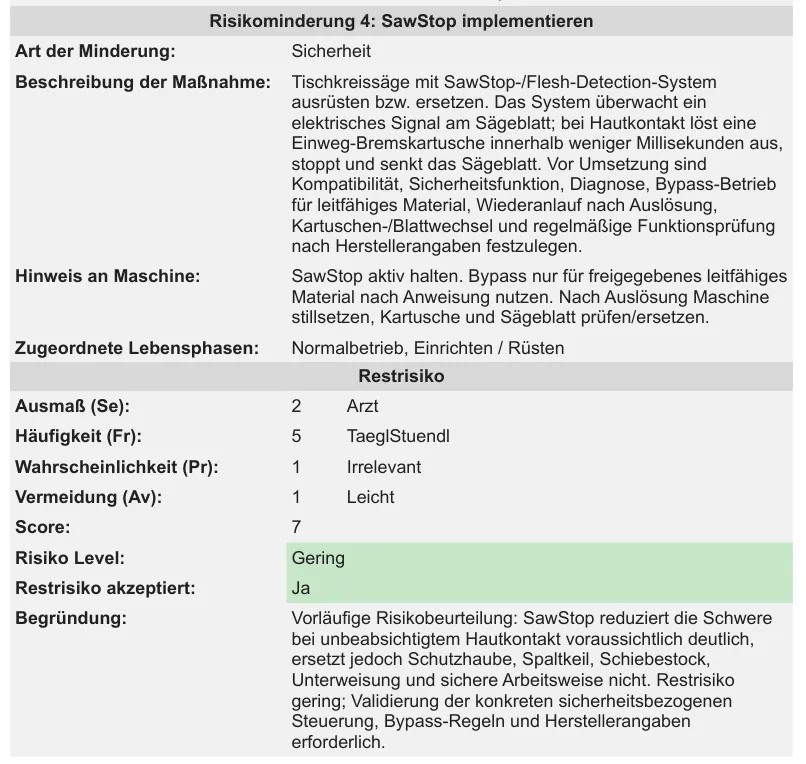
The reviewed entry in the generated PDF report.
The AI takes work off your hands – not the responsibility
A few lines can considerably speed up the research, the structured capture and the initial preparation of a protective measure. They replace neither the expertise required nor the technical review of the proposed solution.
Whether the measure suits the particular machine, which evaluation applies and which evidence is needed remain your decisions.
What Probavis does is make sure you do not begin that decision in front of an empty form, but can build on a structured and reviewable proposal.
Try the AI connection yourself
The trial licence runs for 14 days. Every function is available during that time, including the interface for your own AI system.